Showing posts with label programming. Show all posts

Monday, 20 October 2014

5 Best Tutorial Websites for Learning

Learning is for sharing and some websites are developed worldwide for this purpose.Their goal is to provide free online education for school students, engineers, researchers etc. Library of tutorial is what a user wants while learning.

Tutorialspoint

They've provided with more than 70 tutorials under various categories. As an additional and excellent feature they've even provided with Try-It option to compile and run every program on the same web page. Tutorials Library consists of many tutorials under Programming, Web, Database, Academic, and other sections.

tutorialspoint - techterabyte.com
tutorialspoint


W3schools

It is being visited by users worldwide since 1999. Tutorials Library consists of HTML, CSS, JavaScript, SQL, PHP, and many other website development and design tutorials.


Saturday, 16 August 2014

Life of an Employee


The following pic is developed by us to describe the condition of an Employee. Here, we have demonstrated it using a Java Program.
We've edited and updated the Quote by Great Scientist "Albert Einstein". Hope you'll like it.

The updated Quote:
"If Employees are good only because they fear punishment, and hope for reward, then we are a sorry lot indeed"


Life of an Employee - Techterabyte
Java Program to demonstrate Life of an Employee


Wednesday, 11 September 2013

Stylesheet-Languages


Two types of Style-sheet Languages can be listed:


Stylesheet Languages
two types of Stylesheet Languages


Monday, 12 August 2013

series2


/* C program to print the following series:

*
***
*****
*******
*********

 */


multiplication-of-numbers-using-javascript


This post will show a simple Code in JavaScript to Multiply Numbers in a particular range.

If you're a beginner, then first try to run your first program in JavaScript.

Write the following code in any text file like Notepad, Notepad++.
Now, save this file as "amitJavascript.html"


<html>
     <head><title>www.techterabyte.com javascript sample</title></head>
<script>
<!-- <script> tag is used to insert JavaScript into html document. -->

function multiplyNum(n) {
   var i, mul = 1; // variable declaration

   // loop to multiply numbers
   for (i = 5; i <= n; i++) {
      mul = mul*i;              
   }

   // this will print the multiplication of numbers from number 5
   alert("The multiplication of digits from 5 to "+ n + " is:\n\n\t " + mul);
}

</script>

<body>
<p style="font-weight: bold;">
www.techterabyte.com<br />
...Multiplication of numbers...</p>
<form name="MultiplicationForm">
   Multiplication of the digits from 5 to
   <input name="enterNum" type="text" />
   <input onclick="multiplyNum(MultiplicationForm.enterNum.value)" 
   type="button" value="CalculateResult" />
</form>
</body>
</html>


The above can be explained as:
  • <script> : this tag is used to insert JavaScript into html document
  •  !--      --> : these are used for comments


Now. open the above page(amitJavascript.html) under any Web Browser:

Output :(this will shown on the browser as web page)


Enter the maximum value and click on CalculateResult to generate multiplication result:


Through this you can multiply numbers in JavaScript by inserting <script> tag in HTML.


Tuesday, 16 April 2013

Basic File operations in Ruby


This post will show different file operations under RUBY. Ruby is an open source programming language developed by Yukihiro Matsumoto.

The file operations shown are:
  • Reading file data each one by one
  • Read file data and print it on screen
  • Read file data using custom delimiter with gets
  • Reading first 10 bytes from file
  • Read first 4 bytes and print it under separate lines
  • Reading file into string data
  • Finding position withing a file
  • Writing to a file


The following files are used for below executed program:

file1.txt
Hi, my name is amit
Working at Website

file2.txt
This is second file...

file3.txt
Amit, IT, 24
Ajay, HR, 25

file4.txt  (the following content will be written to this file)
This is a test


# code (http://www.techterabyte.com)
puts "Start with reading file data each one by one..."
File.open("file1.txt","r").each { |line| puts line }

puts "-----------"
puts "Now, read file data and print it on screen..."
f = File.new("file2.txt","r")
puts f.gets
f.close

puts "-----------"
puts "Read file data using custom delimiter with gets..."
File.open("file3.txt","r")  do |f|
4.times {puts f.gets}
end

puts "-----------"
puts "Read first 10 bytes from file..."
File.open("file3.txt") do |f|
   puts f.read(10)
end

puts "-----------"
puts "Read first 4 bytes and print it under separate lines..."
File.open("file3.txt") do |f|
3.times {puts f.read(4)}
end

puts "-----------"
puts "Reading file3.txt into string data..."
data =  File.read("file3.txt")
puts data

puts "-----------"
puts "Finding position withing a file..."
f2= File.open("file2.txt","r")
print "Current position:"
puts f2.pos
f2.pos = 8
puts f2.gets
print "Now, Current position:"
puts f2.pos

puts "-----------"
puts "Writing to a file..."
File.open("file4.txt", "w") do |f|
f.puts "This is a test"
end
puts "text written correctly"

puts "-----------"


# code (http://www.techterabyte.com)


The output is shown here i.e $ruby program1.rb

Start with reading file data each one by one...
Hi, my name is amit
Working at Website
-----------
Now, read file data and print it on screen...
This is second file...
-----------
Read file data using custom delimiter with gets...
Amit, IT, 24
Ajay, HR, 25
nil
nil
-----------
Read first 10 bytes from file...
Amit, IT, 
-----------
Read first 4 bytes and print it under separate lines...
Amit
, IT
, 24
-----------
Reading file3.txt into string data...
Amit, IT, 24
Ajay, HR, 25
-----------
Finding position withing a file...
Current position:0
second file...
Now, Current position:23
-----------
Writing to a file...
text written correctly
-----------


This way you can learn different file operations within a single program at beginner level.

Wednesday, 27 February 2013

Recursion to reverse a string


/*  C program to Reverse a string using Recursion  */


# include <stdio.h>
# include <string.h>
void revFunc(char*,int,int); // function declaration/prototype

void main()
{
   char str[25];
   int len;
   printf("www.techterabyte.com");
   printf("\nEnter string: ");

   // for reading string from stdin
   gets(str);

   // calculating length of string
   len = strlen(str);
   revFunc(str,0,len -1);
   printf("String after reversing:");
   printf("%s\n",str);
   getch();
}

void revFunc(char *x, int start, int end)
{
    char a,b,c;
    if(start >= end)
       return;

    c = *(x + start);
    *(x + start) = *(x + end);
    *(x + end) = c;

    // recursive call
    revFunc(x,++start,--end);
}


Output

www.techterabyte.com
Enter string: blog belongs to AMIT
String after reversing:TIMA ot sgnoleb golb


preprocessor define directive


/* C program to show preprocessor directive # define */


/* # define gives a name to constant value before program compilation */


# include <stdio.h>
# define A(i,j) i+j     // i+j will be inserted where we will find A(i.j)

int main()
{
   int x = 100;
   int y = 210;

  // i+j will get inserted here
   printf("%d \n", A(x, y));
   return 0;
}


Output
310


Tuesday, 19 February 2013

string-length-using-pointers


/* Program to print string length using pointers */


# include <stdio.h>
int main()
{
    char a[]="Amit";
    int l1, l2;
 
    // finding length
    l1 = functionLen(a);
    l2 = functionLen("amtdw.blogspot.in");
 
    // display string1 with it's length
    printf("string1 = %s\n", a);
    printf("length of string1 = %d\n", l1);

    // display string2 with it's length
    printf("string2 = %s\n", "techterabyte.com");
    printf("length of string2 = %d", l2);
}

// function to find length 
functionLen(char *str)
{
    int len = 0;
    // loop till end of string
    while(*str!= '\0') {
       len++;
       str++;
    }
    return(len);
}


Output:
string1 = Amit
length of string1 = 4
string2 = techterabyte.com
length of string2 = 16


Trace-of-a-MATRIX


/*  Function to find TRACE of a matrix in C Language  */


/*
TRACE of a matrix is the sum of it's diagonal elements
*/

void findTrace(int arr[][10], int M, int N)  {

    int i, j , t = 0;

    //  loop calculating trace of matric
    for ( i = 0; i < M; i++)  {
       // inner loop
       for ( j = 0;j < N;j++)   {
           // equality checking for row equal to column i.e.i==j
           if ( i==j) {
              t = trace + arr[i][j];
           }
       }
    }

    printf("Trace of matrix is = %d \n", t);
}


/* ASSUME MATRIX TO BE: */


The trace of the above shown matrix is = 2 + 3 + 4
                                                 Trace = 9


Output:
Trace of matrix is = 9


Saturday, 25 August 2012

DOSshellTURBOC

Using command prompt and accessing DOS shell in Turbo C compiler


This post is related to running a simple c/c++ program using DOS shell. 


All these years, we've used TurboC/C++ compiler to run our c/c++ program by using:
-> COMPILE->alt+f9
-> RUN->run+f9.

Follow the below steps to run your c/c++ program using DOS shell->
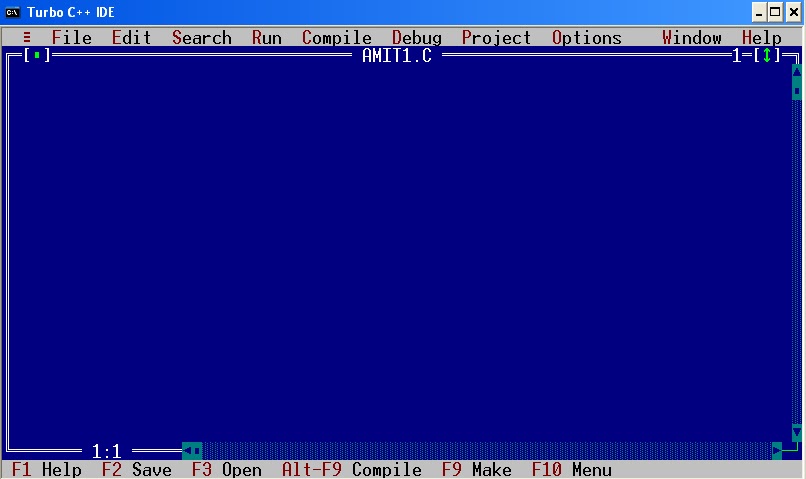
  1. Open turboc

  2. File-> New-> SaveAs-> AMIT1.C
(click on the image)


  3. Write any program, add two numbers program is shown here for simplicity.    


4.  File-> Save (or press F2)  


5.  Now, compile this program first to create it’s exe file.      press->alt+f9 


6.  The most important step, how to reach DOS shell->   

      File -> DOS shell

 7.  DOS shell will open (below)


8. Now enter->  

       AMIT1.exe (name_of_the_file.exe, as we compiled it before) , press ENTER.

      You can see the ouput here i.e. 5 + 10 = 15    


  11.  Write EXIT->       Press ENTER

  12. You’ll be returned to the same blue screen(where your program is visible)..
         Please give your views…Enjoy….


__________________________________________________________________________
Please comment and forward to others if you like this.
Other posts with video tutorial yet to come.....
"I am sure that blogs really help people around the world.
Let us follow this simple thinking of sharing knowledge . . ."

Tuesday, 21 August 2012

javascript

Run your first program in JavaScript !!


This post will describe you about running your first program in JavaScript.
Starting with this, a user must have some introductory knowledge:
  • It is a scripted weekly-typed, dynamic language.
  • Scripting language is a light-weight programming language.
  • Appeared in the year 1995 and was designed by Brendan Eich.
  • It is an implementation of ECMAScript language standard.
  • File-extension is .js
  • It is used in web pages, desktop apps, internet servers etc.

Write the following code in any text file like notepad, notepad++ etc,
 then save this file as .html or .htm extension: amitdiwanJS.html

_____________________________________________________________________
<html>
     <head><title>amtdw.blogspot.com</title></head>
<body>   

<!-- <script> tag is used to insert JavaScript into html document. -->
<script>
document.write("<p><u>first javascript program for beginners</u></p>");
document.write("<b>My Blog:amtdw.blogspot.com</b></p>") ;
</script>

</body>
</html>


____________________________________________________________________

The above can be explained as:
  •  for HTML tags refer my blog post for html i.e. 
  • <script> : this tag is used to insert JavaScript into html document.
  • document.write: this prints the text to the page.
  •  !--      --> : these are used for comments


Now. open the above page(amitdiwanJS.html) under any Web Browser:


Output :(this will shown on the browser as web page)


This way you can run your program in JavaScript by inserting <script> tag in HTML
Simple... :)


__________________________________________________________________________
Please comment and forward to others if you like this.
Other posts with video tutorial yet to come.....
"I am sure that blogs really help people around the world.
Let us follow this simple thinking of sharing knowledge . . ."


Saturday, 11 August 2012

series1

 /*  C Program to print following series:

*
**
***
****
*****

 */


 #include <stdio.h>

 int main()
   {
    int i, n , m;
   
    printf("!! www.techterabyte.com !!");

    // enter rows
    printf("\nEnter number of rows: ");
    scanf("%d\n",&n);
   
    // loop till number of rows
    for(i=1;i<=n;i++) {
   
       for(m=1;m<=i;m++) {      
           printf("*");
       }

       // new line
       printf("\n");   
    }

    return(0);
   }


Output

!! www.techterabyte.com !!
Enter number of rows: 5
*
**
***
****
*****

FindingSameAlphabetsClanguage


/*  Program in C language to find common Alphabets!!  */


/*

c1 = {'$','8','5','a','7','t','8','e'};
c2 = {'1','t','6','0','%','a','7','9'};

*/


#include <stdio.h>
int main()
 {
   // c1 and c2 character array
   char c1[10] = {'$','8','5','a','7','t','8','e'};
   char c2[10] = {'1','t','6','0','%','a','7','9'};
   int i, j;

   // looping till number of elements
   for(i=0;i<8;i++) {

       for(j=0;j<8;j++) {

         // comparing both
         if(c1[i]==c2[j]) {

             // comparing alphabets under c1 and c2
            printf("www.techterabyte.com");
             printf("Elements common in both arrays:");
             if(c1[i]>='a'&&c1[i]<='z') {

                  printf("\nElement = %c",c[i]);
             }
         }
      }
   }

   return(0);
 }


Output

www.techterabyte.com
Elements common in both arrays:
Element = a
Element = t


Friday, 10 August 2012

StringReverseClanguage


C Program to Reverse String !!!


/*  Program to reverse string  */

#include <stdio.h>
#include <string.h>
int main()
  {
      int i, len, a;
      char str[25] = "techterabyte.com";
      char revstr[25] = "\0";
     
      // finding length of string str
      len = strlen(str);
      a = len-1;

      // loop till string length
      for(i=0;i<=len;i++)   {
           revstr[a] = str[i];
           a--;
       }
      printf(" Reversed String = %s", revstr);
      return(0);
 }


Output

Reversed String = moc.etybarethcet


Thursday, 2 August 2012

CreateJarFileJava


How to create jar-file in java by following these 4 steps:


This post will explain you how to create jar file under java:
  • Jar file is java archive file.
  • In Java, we can combine all classes in  .jar ("java archive") file. 
  • You can create your own jar file by combining several classes.
  • After creating, you can run this project anywhere on just double-clicking your .jar file.

Follow the following steps:

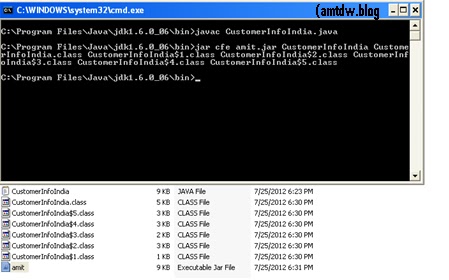
  1. Go to your project folder in Bin:


           2.     Compile your java program to create class file
                  (CustomeInfoIndia.java)


          3.   Note: If compilation is showing single class file then mention that single class file only.
                     If compilation is showing multiple class file then mention all the class files.


          Now, type what is being shown under (for multiple class file generation)
  
               c = create a JAR file
               f = this shows that the output will go to a file rather than to stdout
               amit.jar = name of jar file generated

 
          Below command will generate compressed JAR file placed at the same location.


       (above screenshot)
       You can see the number of class files generated after compilation and amit.jar
        file can also be seen here.


       4.       Just double-click on amit.jar file


               In this way you can create jar file in Java.


__________________________________________________________________________
Please comment and forward to others if you like this.
Other posts with video tutorial yet to come.....
"I am sure that blogs really help people around the world.
Let us follow this simple thinking of sharing knowledge . . ."


Wednesday, 18 July 2012

HTML


HyperText Markup Language (HTML) 


This post will give introduction about markup language known as HTML.
It is a markup language for displaying static web pages and to display content on website.
According to me, this is the simplest language.
You can play around with this language to understand it thoroughly.
But, if you've just started with it then this simple understanding of this post will help you a lot.

This is being:

Extended from: SGML
Extended to: XHTML


The filename extensions used is: .html, .htm

You can use any text editor i.e Notepad, Notepad++

 HTML is written in the form of HTML elements which consist of tags enclosed in angle brackets ie. < > (like <html>, <head>, <body>), within the web page content.


HTML - techterabyte.com
Code for HTML


Save the above page as amtdw1.html or amtdw1.htm.

The above shows the following tags:
 <html> = tag for html
 <title> = title visible on the top of web page
 <head> = tag for heading
 <body> = content to be shown n the web page


Now. open the above page under any Web Browser:


Output :(this will be shown on the browser as web page)


HTML - techterabyte.com
OUTPUT


     This way you can run your program in HTML.


__________________________________________________________________________
Please comment and forward to others if you like this.
Other posts with video tutorial yet to come.....
"I am sure that blogs really help people around the world.
Let us follow this simple thinking of sharing knowledge . . ."


Sunday, 1 July 2012

Run your first C#.net Console Application


This post will assists you in running your first C#.net Console Application. Before proceeding further I would like to list the framework/tools which will be used.

Software/Tools used

  •      .NET Framework4.0
  •      Microsoft Visual Studio2010                                            

Steps
Follow the below given steps:

  1. To open a new project in Microsoft Visual Studio 2010, go to file and select new. Now click on project. Figure 1: Open new project             
C#.net - techterabyte.com
open new project

2.   To open Console Application under Visual C #
                -Go to left panel-> Recent Tempaltes-> VisualC#->Windows
                -Click on Windows
                -Now, select Console Application on the right

      Figure 2: Open Console Application
C#.net - techterabyte.com
New Console Application

3. Enter name of New Project: amtdwCMDconsole
    Figure 3:Enter project name and press enter.
C#.net - techterabyte.com
Project: amtdwCMDconsole
4.  After pressing OK, you can see that below .cs file will get open:
     Figure 4: Program.cs file generated
C#.net - techterabyte.com
Program.cs file
        

5.   Code Snippet 1: Program.cs

       _________________________________________
    using System;
    using System.Collections.Generic;
    using System.Linq;
    using System.Text;

    namespace amtdwCMDconsole
    {
     class Program
     {
      static void Main(string[] args)
      {
      Console.WriteLine("This is related to C# console application");
      Console.WriteLine("amtdw.blogspot.com");
         
      // for reading the above content
      Console.ReadLine();
      }
     }
    }


6.  Now, run the project. Press F5 or click on the red button.
     Figure 5: Start Debugging
     
C#.net - techterabyte.com
Start Debugging (F5)
       

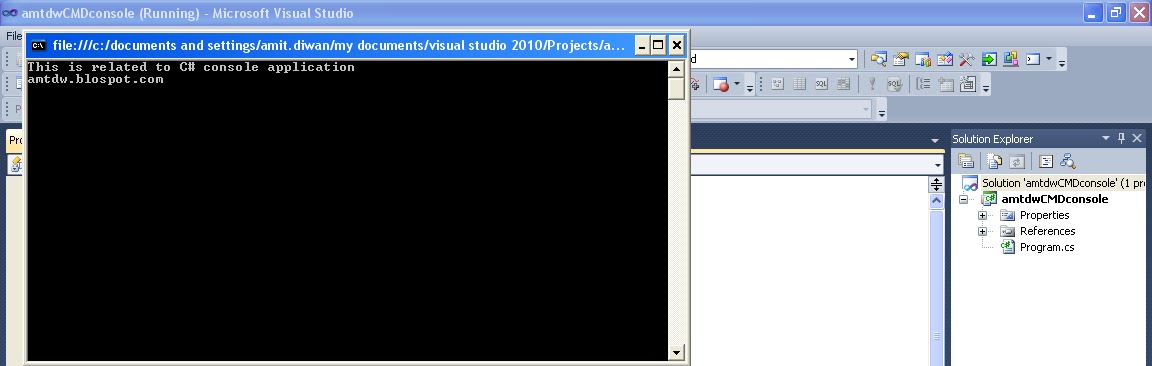
7.  Now, the output is displayed below:
     Figure 6: Console Application Output

C#.net - techterabyte.com
OUTPUT
   

__________________________________________________________________________
Please comment and forward to others if you like this.
Other posts with video tutorial yet to come.....
"I am sure that blogs really help people around the world.
Let us follow this simple thinking of sharing knowledge . . ."


Thursday, 31 May 2012

C code to shutdown your computer


C language code to shutdown your computer...


This post will show a simple example to create a small shutdown application in C Programming.
The snippet shows a simple code to create .exe by compiling it under TurboC/C++ compiler.
I shut down my system in the same way by double-clicking  on  the exe file generated by compiling this program under C language.

//
// -- CODE –
//

// ***********************************************************************
// www.techterabyte.com C example!!!
// -- start of code
// header files
#include<stdio.h>
#include<stdlib.h>
void main()
{
   char choice;
   // enter  yes/no
   printf("Shutdown your computer now(y/n)?");
   printf("\t Yes:y/n),\n");
   printf("\t No:n/n) \n");
   scanf("%c",&choice);
   if( choice == 'y' || choice == 'Y' ) {
      system("C:\\WINDOWS\\System32\\shutdown -s");
   }
  getch();
}
// www.techterabyte.com C example!!!
// --end of code
// ***********************************************************************

Just compile it by using any compiler and create exe file.
I am using  Turbo C/C++ compiler

Below screenshot shows the code:
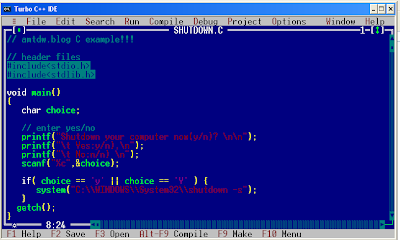
C programming - techterabyte.com
C program code to shutdown system


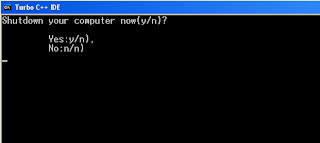
The screenshot shows the output which can be seen after -> Ctrl + F9
Enter y or Y and press enter--
C programming - techterabyte.com
enter value

After successfully running the program, copy the exe file from:
  •    TC\BIN\SHUTDOWN.exe
  •    To any location on the computer(or desktop)
  •    Just double click, enter y or Y
  •    Successful shutdown… 


___________________________________________________________________
Please comment and forward to others if you like this.
Other posts with video tutorial yet to come.....

"I am sure that blogs really help people around the world.
Let us follow this simple thinking of sharing knowledge . . ."